Our Short List of 3

- Best for: Builders who want a pump display in a case with 360mm radiator mounts.
- 360mm AIO CPU cooler
- LCD display on the pump
- Black finish

- Best for: Builders who want wide socket coverage stated in the listing.
- 360mm AIO liquid CPU cooler
- TUF Gaming MF-12 fans
- Three-phase, six-slot, four-pole pump
- Reinforced tubing

- Best for: Compact cases that accept a 240mm radiator but not a 360mm one.
- 240mm water cooling CPU cooler
- Double PWM ARGB fans with S-FDB bearings
- PWM-controlled pump
- AMD AM4 and AM5 support
All 5 Picks at a Glance
| Product | Specs | Action |
|---|---|---|
| 1. NZXT Kraken Plus 360 |
| Check price on Amazon |
| 2. ASUS TUF Gaming LC III ARGB 360mm |
| Check price on Amazon |
| 3. Thermalright Aqua Elite 240 V3 |
| Check price on Amazon |
 4. MSI MAG Coreliquid A13 240 |
| Check price on Amazon |
 5. CORSAIR iCUE Link Titan II 360 RX LCD |
| Check price on Amazon |
Key takeaways
- Compare five closed-loop liquid CPU coolers, from 240mm radiators to 360mm LCD models, and pick the right one for your case, socket, and noise tolerance.
A closed-loop water cooler moves heat away from the processor through a sealed loop of liquid, a pump, and a radiator with fans, with no filling, no custom tubing, and no maintenance of the liquid itself. That sealed design is the whole appeal: the loop arrives pre-filled and ready to mount, so the main decisions are radiator size, socket support, and how much noise and lighting you are willing to live with.
Every pick below is a sealed all-in-one liquid cooler whose listing states its liquid-cooling form in its title. Radiator size shapes both cooling headroom and case fit, socket wording decides whether the cooler mounts on your board at all, and fan and pump details decide the noise character. Check your case radiator clearance and your socket before ordering, because those two facts rule out more coolers than any other detail.
Quick Picks
As an Amazon Associate we earn from qualifying purchases.
| Product | Best for | Key spec from title |
|---|---|---|
| NZXT Kraken Plus 360 | A display on the pump | 360mm AIO with LCD |
| ASUS TUF Gaming LC III ARGB | Broad socket support | 360mm AIO, LGA1851 and AM5 |
| Thermalright Aqua Elite 240 V3 | Compact 240mm builds | 240mm radiator, PWM ARGB fans |
| MSI MAG Coreliquid A13 240 | Dual-fan 240mm cooling | 240mm radiator, dual 120mm fans |
| CORSAIR iCUE Link Titan II 360 RX LCD | A screen-led 360mm build | 360mm AIO with LCD |
How to Choose
Match the Radiator to Your Case
Radiator size is the first filter, because a radiator that does not fit the case cannot be used at all. A 240mm radiator needs two adjacent 120mm fan mounts, while a 360mm radiator needs three, and the mounting positions differ from case to case. Measure the top or front mounting area, check the stated clearance for radiator plus fans, and confirm that tall memory or a thick graphics card does not intrude into the same space. A 360mm radiator offers more surface area for heat transfer, but only when the case genuinely accepts it. Buying the larger size without checking fit is the most common sizing mistake in this class.
Confirm Socket Support in the Listing
Socket support is stated in the listing title or not at all, and that wording is the only reliable check before purchase. Modern Intel sockets such as LGA1700 and LGA1851 and AMD sockets AM4 and AM5 use different mounting hardware, and a cooler that fits one family does not automatically fit the other. Read the socket list in the listing title, compare it with your motherboard socket, and treat a listing that leaves socket support unstated as unverified rather than assuming it fits. Brackets for a new socket sometimes ship separately, so confirm whether the box includes the hardware your board needs.
Read Fan and Pump Wording Carefully
Fan and pump wording tells you how the cooler will sound and how it will behave under load. PWM fans change speed with temperature, so a listing that states PWM control describes a cooler that can run quietly at idle and ramp up under load. Bearing type, fan count, and radiator thickness all shape noise, while pump design shapes both noise and long-term behaviour. ARGB lighting is a separate question from cooling performance: it changes how the build looks, not how cool the processor runs. Decide how much lighting matters before letting it steer the choice.
Weigh the Display Against Simplicity
Some closed-loop coolers carry a screen on the pump head, and that screen is a genuine fork in the road. A display shows temperatures or custom images and suits builders who want monitoring visible inside the case, but it adds software, cabling, and cost. A cooler without a display is simpler to install and leaves fewer things to configure. Neither choice cools better by itself; the screen is about information and appearance. If you want a clean install with nothing to set up beyond mounting and fan curves, skip the screen and spend the difference on radiator size instead.
The 5 Best Options
1. NZXT Kraken Plus 360
- Best for: Builders who want a pump display in a case with 360mm radiator mounts.
- 360mm AIO CPU cooler
- LCD display on the pump
- Black finish
Builders who want a pump display in a case with 360mm radiator mounts.
The listing leaves socket support unstated, so confirm mounting hardware for your board before buying.
The NZXT Kraken Plus 360 pairs a 360mm radiator with an LCD on the pump head, which suits builders who want a visible display without adding a separate monitoring panel. Its listing states the radiator size, the screen, and the black finish, and leaves socket support unstated, so buyers must confirm mounting hardware for their board before ordering. The 360mm size needs three adjacent 120mm mounts, and that requirement alone decides whether this cooler fits a given case. Treat the screen as the deciding feature: if a pump display matters to the build, this listing states it plainly.
Watch out for: The listing leaves socket support unstated, so confirm mounting hardware for your board before buying.
2. ASUS TUF Gaming LC III ARGB 360mm
- Best for: Builders who want wide socket coverage stated in the listing.
- 360mm AIO liquid CPU cooler
- TUF Gaming MF-12 fans
- Three-phase, six-slot, four-pole pump
- Reinforced tubing
Builders who want wide socket coverage stated in the listing.
The 360mm radiator needs three adjacent mounts, so verify case clearance first.
The ASUS TUF Gaming LC III ARGB covers an unusually wide socket list for a single listing, naming Intel LGA1851, LGA1700, and LGA1200 alongside AMD AM5 and AM4, which makes it a straightforward choice when the board socket is already known. Its listing also states TUF Gaming MF-12 fans, a three-phase pump, and reinforced tubing, giving a fuller picture of the hardware than most titles in this class. The 360mm radiator needs three fan mounts, so case clearance still comes first. For builders who want broad compatibility stated up front, this is the most completely described pick here.
Watch out for: The 360mm radiator needs three adjacent mounts, so verify case clearance first.
3. Thermalright Aqua Elite 240 V3
- Best for: Compact cases that accept a 240mm radiator but not a 360mm one.
- 240mm water cooling CPU cooler
- Double PWM ARGB fans with S-FDB bearings
- PWM-controlled pump
- AMD AM4 and AM5 support
Compact cases that accept a 240mm radiator but not a 360mm one.
Match the full AE240 V3 model code, since other Aqua Elite versions differ.
The Thermalright Aqua Elite 240 V3 is the compact option in this group, with a 240mm radiator that fits cases where a 360mm unit cannot. Its listing is unusually specific about hardware, naming double PWM ARGB fans with S-FDB bearings, a PWM-controlled pump, and a long socket list covering AMD AM4 and AM5 plus Intel LGA1150, LGA1151, LGA1200, LGA1700, and LGA1851. That breadth of socket wording makes it easy to confirm fit from the title alone. The model code AE240 V3 distinguishes this listing from other Aqua Elite versions, so match the full model when ordering.
Watch out for: Match the full AE240 V3 model code, since other Aqua Elite versions differ.
4. MSI MAG Coreliquid A13 240
- Best for: Mid-tower builds with a 240mm mount that want dual-fan airflow.
- 240mm radiator
- Dual 120mm ARGB PWM fans
- Intel LGA1700 and LGA1851 support
- AMD AM5 and AM4 support
Mid-tower builds with a 240mm mount that want dual-fan airflow.
Confirm the two adjacent 120mm mounts sit where the radiator can actually breathe.
The MSI MAG Coreliquid A13 240 is a dual-fan 240mm cooler whose listing states its radiator size, its two 120mm ARGB PWM fans, and support for Intel LGA1700 and LGA1851 alongside AMD AM5 and AM4. That combination suits mid-tower builds where a 240mm mount is available and a second fan is wanted for airflow across the radiator. The black finish keeps the look neutral, and the ARGB fans add lighting that can be left off. As with every 240mm unit, the mount positions matter more than the radiator length: two adjacent 120mm mounts in the right place are what make this cooler usable.
Watch out for: Confirm the two adjacent 120mm mounts sit where the radiator can actually breathe.
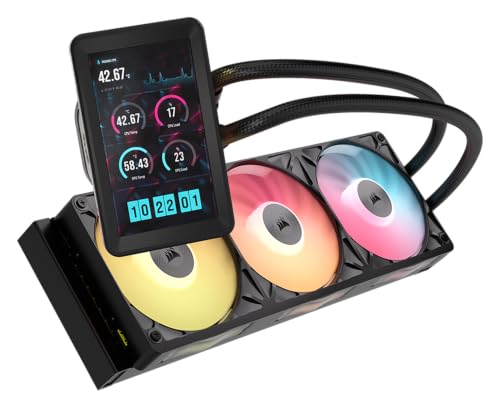
5. CORSAIR iCUE Link Titan II 360 RX LCD
- Best for: Builders who want a screen-led 360mm cooler inside the CORSAIR ecosystem.
- 360mm AIO liquid CPU cooler
- LCD display on the pump
- Black finish
Builders who want a screen-led 360mm cooler inside the CORSAIR ecosystem.
The listing leaves socket support unstated, so confirm mounting hardware for your board before buying.
The CORSAIR iCUE Link Titan II 360 RX LCD pairs a 360mm radiator with an LCD on the pump head, placing it beside the NZXT as the second screen-led option in this group. Its listing states the 360mm size, the LCD, and the black finish, and leaves socket support unstated, so mounting hardware must be confirmed for the specific board before ordering. The iCUE Link naming points to the CORSAIR ecosystem for control and lighting, which suits builders already using that software. As with any 360mm unit, case clearance decides everything: three mounts, measured first, before any other consideration.
Watch out for: The listing leaves socket support unstated, so confirm mounting hardware for your board before buying.
Which One Fits Your Situation
A Small Case With Room for Two Fans
A 240mm cooler is the natural fit when the case offers two adjacent 120mm mounts and no more. The Thermalright Aqua Elite 240 V3 and the MSI MAG Coreliquid A13 240 both state 240mm radiators, and the Thermalright adds the widest socket list in this group. Measure the mounting area, check memory and graphics card clearances, and pick between the two on socket wording and fan preference. Neither needs a third mount.
A Large Case Built Around a Display
When the case has three 120mm mounts and the build is meant to show off its cooling, a 360mm cooler with a screen makes sense. The NZXT Kraken Plus 360 and the CORSAIR iCUE Link Titan II 360 RX LCD both state an LCD on the pump, so the choice comes down to ecosystem and appearance. Confirm socket hardware for the board, since both listings leave socket support unstated. Only choose the screen when the display itself is wanted.
A First Liquid Cooler With a Known Socket
First-time buyers should start from the socket list and work outward. The ASUS TUF Gaming LC III ARGB states Intel LGA1851, LGA1700, and LGA1200 plus AMD AM5 and AM4 in its listing, which removes the guessing from mounting. Its 360mm radiator still needs three mounts, so case clearance is checked next. For a first sealed loop, a listing that states both the form and the fit in its title is worth more than any extra feature.
A Quiet Build That Still Cools Well
Noise-sensitive builders should favour PWM fan wording, since fans that follow temperature curves run slowly at idle and only ramp up under load. The Thermalright and MSI listings both state PWM fans, and the Thermalright adds bearing wording. A 240mm radiator in a case with good airflow can serve a quiet build well, while a 360mm radiator adds surface area that lets fans spin more slowly. Either way, fan control settings after installation matter as much as the hardware.
Common Mistakes
- Buying a 360mm radiator without measuring three adjacent 120mm mounts in the case.
- Assuming a cooler fits a socket the listing never names.
- Treating ARGB lighting as a cooling feature instead of an appearance choice.
- Ordering by brand alone and ignoring the radiator size and socket wording in the title.
- Skipping the clearance check for tall memory or a long graphics card beside the radiator.
Frequently Asked Questions
What does closed-loop mean for a CPU cooler?
Closed-loop means the liquid, pump, radiator, and tubing arrive sealed as one unit, pre-filled and ready to mount. Nothing needs filling or bleeding, and no separate reservoir or custom tubing is involved. The loop is a single sealed assembly, which is why these coolers are also called all-in-one liquid coolers.
Is a 360mm radiator always better than a 240mm one?
Not always, because fit comes first and surface area second. A 360mm radiator offers more area for heat transfer, but only when the case genuinely accepts three 120mm mounts with room for fans. A 240mm radiator that fits well and breathes freely serves many builds better than a 360mm unit squeezed into a case that cannot hold it.
Do I need to refill a closed-loop cooler?
No refilling is part of normal use, since the loop is sealed at the factory. The liquid stays inside the assembly for the life of the cooler, and there is no fill port to use. If the loop ever loses liquid or the pump fails, the remedy is replacement of the unit rather than servicing the liquid.
Does an LCD on the pump help cooling?
An LCD does not change cooling performance by itself. It shows temperatures or custom images and suits builders who want monitoring visible inside the case, but it adds software and cabling. Cooling depends on the radiator, fans, and pump, so choose the screen for appearance and information, not for lower temperatures.