Our Short List of 3

- Best for: A small flat where the ISP router drops connections in the evening.
- Wi-Fi 6 dual-band router rated AX1800
- 5 GHz speed up to 1201 Mbps and 2.4 GHz speed up to 574 Mbps
- Four external antennas
- One Gigabit WAN port and four Gigabit LAN ports

- Best for: A busy family home that needs wide 5 GHz channels and simple parental controls.
- Wi-Fi 6 dual-band router rated AX3000
- 5 GHz speed up to 2402 Mbps and 2.4 GHz speed up to 574 Mbps
- 160 MHz channel support on 5 GHz
- One Gigabit WAN port and four Gigabit LAN ports

- Best for: A large single-storey home where one router must cover distant rooms.
- Wi-Fi 6 dual-band router rated AX5400
- Six-stream design with six high-performance antennas
- 1.5 GHz triple-core processor
- One Gigabit WAN port and four Gigabit LAN ports
All 5 Picks at a Glance
| Product | Specs | Action |
|---|---|---|
| TP-Link Archer AX21 |
| Check price on Amazon |
| TP-Link Archer AX55 |
| Check price on Amazon |
| TP-Link Archer AX73 |
| Check price on Amazon |
 NETGEAR Nighthawk RAX50 |
| Check price on Amazon |
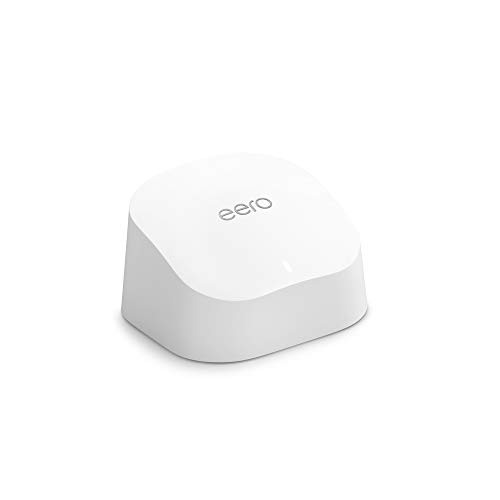 Amazon eero 6 |
| Check price on Amazon |
Key takeaways
- Find the best channels for home routers and the five Wi-Fi 6 routers that make channel changes simple, with clear picks for flats, houses and busy homes.
Most homes do not suffer from a slow internet plan. They suffer from a router shouting on the same crowded channel as every neighbour on the street, so streams stall in the evening even though a speed check in the morning looked fine. Picking the right channel is the decision that separates a home network that feels calm from one that drops video calls whenever the flat next door starts a download. The channel, the band and the width you choose decide how much clean air your devices actually get.
This guide is for renters in crowded apartment blocks, families in detached houses with a router at one end, and anyone whose Wi-Fi weakens at dinner time. Every router below was chosen from the names and specifications on its Amazon product page, and each one gives you a practical way to move off a congested channel, whether through automatic selection or manual controls in its app.
Quick Picks
As an Amazon Associate we earn from qualifying purchases
| Product | Best for | Key spec from title |
|---|---|---|
| TP-Link Archer AX21 | A small flat replacing a weak ISP box | AX1800 dual-band Wi-Fi 6 router |
| TP-Link Archer AX55 | A busy household wanting wider 5 GHz channels | AX3000 dual-band Wi-Fi 6 router with 160 MHz support |
| TP-Link Archer AX73 | A large home needing six antennas and long reach | AX5400 dual-band Wi-Fi 6 router, 6-stream |
| NETGEAR Nighthawk RAX50 | A bigger floor plan with a stated coverage figure | AX5400 dual-band router, coverage up to 2,500 sq. ft. |
| Amazon eero 6 | A small home that wants mesh without fiddling | AX1800 dual-band mesh Wi-Fi 6 router, covers up to 1,500 sq. ft. |
How to Choose
Start with the 2.4 GHz band and its three clean channels
On 2.4 GHz only channels 1, 6 and 11 stay clear of each other, so every other choice overlaps a neighbour and adds interference instead of avoiding it. Scan the networks around you, count how many sit on each of those three, then settle on the emptiest one and leave it alone for a week before judging the result. A router with a clear channel survey in its app, like the Archer models below, makes this a five-minute job rather than guesswork. If the emptiest channel still feels slow, the band itself may be the problem, not the number you picked.
Use 5 GHz channels where the air is wider
The 5 GHz band offers far more room, with channels such as 36, 44, 149, 157 and 161 giving devices space to breathe away from the crowded 2.4 GHz spectrum. Lower 5 GHz channels suit homes near radar installations or airports, while the higher range often stays quieter in suburban streets. Short-range devices close to the router gain the most here, since 5 GHz carries more data but fades faster through walls. Put laptops and streaming boxes on 5 GHz when they sit in the same room as the router, and keep phones that wander the house on the band that reaches further.
Match channel width to how crowded your street is
A 20 MHz channel on 2.4 GHz is the safe default in a dense block, because it leaves room for neighbours and cuts the chance of overlapping signals. On 5 GHz, an 80 MHz channel can double the airtime available to a single device, yet in a packed apartment building it may collide with three other networks and perform worse than a narrower setting. The Archer AX55 supports 160 MHz channels, which suits a detached house with few nearby networks and a fast plan, while a flat dweller should treat 40 MHz as the sensible ceiling on 5 GHz. Change one width at a time and test at the hour your network normally struggles.
Let the router scan, then lock in what works
Automatic channel selection sounds lazy, yet a good router rescans its surroundings and moves when a neighbour’s new access point appears. The catch is that some routers switch channels at awkward moments, dropping a call mid-sentence, so check whether yours lets you schedule scans or stick with a manual pick once you find a quiet one. Mesh systems such as the eero 6 handle this silently across nodes, which suits households that never want to open a settings page. Standalone routers with an app, like the TP-Link and NETGEAR models here, give you the middle ground: run the scan, read the result, and set the channel yourself.
The 5 Best Options
TP-Link Archer AX21
- Best for: A small flat where the ISP router drops connections in the evening.
- Wi-Fi 6 dual-band router rated AX1800
- 5 GHz speed up to 1201 Mbps and 2.4 GHz speed up to 574 Mbps
- Four external antennas
- One Gigabit WAN port and four Gigabit LAN ports
A small flat where the ISP router drops connections in the evening.
It has no 6 GHz band and no USB port, so check that neither matters for your devices before buying.
The Archer AX21 fits the renter who wants a cheap, straightforward upgrade from a tired ISP gateway and a router that makes channel changes easy through the Tether app. Its dual-band Wi-Fi 6 design gives you the three clean 2.4 GHz channels plus the wider 5 GHz range, and its four external antennas push the signal into rooms the old box never reached. Setup takes minutes, and the app puts band and channel controls where a non-technical buyer can actually find them.
Watch out for: It has no 6 GHz band and no USB port, so check that neither matters for your devices before buying.
TP-Link Archer AX55
- Best for: A busy family home that needs wide 5 GHz channels and simple parental controls.
- Wi-Fi 6 dual-band router rated AX3000
- 5 GHz speed up to 2402 Mbps and 2.4 GHz speed up to 574 Mbps
- 160 MHz channel support on 5 GHz
- One Gigabit WAN port and four Gigabit LAN ports
A busy family home that needs wide 5 GHz channels and simple parental controls.
Its Gigabit ports cap wired speed at one gigabit, so confirm your plan does not exceed that before buying.
The Archer AX55 suits the household whose 5 GHz band feels cramped, because its 160 MHz channel support opens a wider lane than most routers in this class offer. That extra width matters when two people stream in high definition while a third joins a video call, and the router’s HomeShield tools add parental controls for families sharing one network. With a USB 3.0 port for shared storage and VPN server support, it covers more ground than a basic replacement box without asking for a complicated setup.
Watch out for: Its Gigabit ports cap wired speed at one gigabit, so confirm your plan does not exceed that before buying.
TP-Link Archer AX73
- Best for: A large single-storey home where one router must cover distant rooms.
- Wi-Fi 6 dual-band router rated AX5400
- Six-stream design with six high-performance antennas
- 1.5 GHz triple-core processor
- One Gigabit WAN port and four Gigabit LAN ports
A large single-storey home where one router must cover distant rooms.
Its size and six antennas need shelf space and clearance, so measure the spot where it will sit before buying.
The Archer AX73 belongs in the larger home where a single router must reach the far bedroom without a mesh kit, and its six antennas give it the longest reach in this lineup. Six-stream Wi-Fi 6 spreads capacity across more devices at once, which helps when smart speakers, cameras and phones all compete for airtime in the evening. The 1.5 GHz triple-core processor keeps the admin interface responsive while the router juggles that load, and HomeShield adds a layer of network protection for households with many connected gadgets.
Watch out for: Its size and six antennas need shelf space and clearance, so measure the spot where it will sit before buying.
NETGEAR Nighthawk RAX50
- Best for: A larger floor plan where a stated coverage figure guides the choice.
- Wi-Fi 6 dual-band router rated AX5400
- Wireless speed up to 5.4 Gbps
- Coverage up to 2,500 sq. ft.
- Six-stream design
A larger floor plan where a stated coverage figure guides the choice.
It is a dual-band router with no 6 GHz band, so confirm your devices do not need the newer band before buying.
The Nighthawk RAX50 is the pick for buyers who want a coverage figure they can plan around, because its listing states coverage up to 2,500 sq. ft. alongside an AX5400 rating. That combination suits a detached house where the router sits centrally and the bedrooms sit two walls away, and the six-stream design keeps streams steady when several people use the network at once. The Nighthawk app walks you through channel and band choices without burying them in menus, which matters when you want to move off a congested channel quickly.
Watch out for: It is a dual-band router with no 6 GHz band, so confirm your devices do not need the newer band before buying.
Amazon eero 6
- Best for: A small home that wants dead zones gone without manual channel tuning.
- Wi-Fi 6 dual-band mesh router rated AX1800
- Coverage up to 1,500 sq. ft. per node
- Supports internet plans up to 900 Mbps
- Connects more than 75 devices
A small home that wants dead zones gone without manual channel tuning.
It has only two Ethernet ports, so check how many wired devices you need to plug in before buying.
The eero 6 fits the household that would rather never think about channels at all, because its mesh design manages band and channel choices across its nodes automatically. One node covers up to 1,500 sq. ft. and supports more than 75 connected devices, which covers a small home and its growing collection of smart plugs, bulbs and speakers. A built-in Zigbee hub and Thread border router let it act as the smart-home hub too, so the router earns its place on the shelf even in a home with no interest in networking settings.
Watch out for: It has only two Ethernet ports, so check how many wired devices you need to plug in before buying.
Which One Fits Your Situation
You live in a crowded apartment block
Pick the Archer AX21 and set 2.4 GHz to the emptiest of channels 1, 6 or 11, with a 20 MHz width, then move nearby devices to 5 GHz on channel 44 or 149. Its low cost leaves nothing wasted on range you cannot use through concrete walls, and the Tether app makes the channel survey simple enough to repeat when a new neighbour moves in.
Your household streams on several screens every evening
Pick the Archer AX55, because its 160 MHz support on 5 GHz gives simultaneous streams a wider lane than the other budget picks here. Put the streaming boxes on 5 GHz, keep phones on 2.4 GHz when they roam, and let the router’s HomeShield controls set bedtime limits for the children’s devices without extra hardware.
One router must reach the far end of a big house
Pick the Nighthawk RAX50 if you want a stated coverage figure to plan around, or the Archer AX73 if you prefer six antennas and a stronger processor for the same job. Place either centrally and high up, choose a quiet 5 GHz channel in the 149 to 161 range for nearby rooms, and let distant devices fall back to 2.4 GHz channel 1, 6 or 11 for range.
You never want to open a settings page again
Pick the eero 6 and let its mesh system choose channels and steer devices between bands on its own. Add a second node later if a dead zone appears at the far end of the house, and use its Zigbee hub to connect smart lights and locks without buying a separate hub.
Common Mistakes
- Leaving the router on the factory channel, which is usually the same channel every neighbour’s router shipped with.
- Choosing a 2.4 GHz channel other than 1, 6 or 11, so the signal overlaps two neighbours at once instead of avoiding them.
- Setting the widest channel width in a crowded building, where a narrower channel would suffer less interference.
- Hiding the router inside a cabinet or behind a television, which weakens the signal more than any channel change can fix.
- Judging a new channel after five minutes at midday, instead of testing it at the evening hour when the network normally struggles.
Frequently Asked Questions
What is the best channel for a home router on 2.4 GHz?
Channels 1, 6 and 11 are the only choices that do not overlap each other, so one of those three is always the right answer. Scan for nearby networks, pick the emptiest of the three, and use a 20 MHz width in a crowded area. If all three look busy, choose the one with the fewest strong signals rather than the one with the most networks.
What is the best channel for a home router on 5 GHz?
Channels 36, 44, 149, 157 and 161 are the common clean choices, with the higher range often quieter in suburban homes. Use an 80 MHz width when few neighbours sit nearby, and drop to 40 MHz if the scan shows several networks on the same channel. Devices close to the router benefit most from 5 GHz, while distant rooms usually do better on 2.4 GHz.
Should I let my router choose the channel automatically?
Automatic selection works well when the router rescans regularly and moves only when a channel truly degrades. It suits mesh systems and households that never open settings, yet a router that switches mid-call can interrupt video meetings. Try automatic mode for a week, note the channel it settles on, and switch to manual if it changes at awkward times.
Does changing the Wi-Fi channel really improve speed?
It improves the airtime your devices get, which often matters more than the headline speed of the router itself. A quiet channel means fewer retransmissions and less waiting for a clear moment to send, so streams buffer less and calls drop less often. If the channel is already clean and the connection still struggles, the problem is more likely placement, an old device, or the internet plan itself.