Our Short List of 3

- Best for: Younger kids aged 3 to 7 who need the biggest screen for reading and learning apps.
- 10.1-inch 1080p Full HD display, 1920 x 1200, 224 ppi
- Octa-core processor, 3 GB RAM
- 32 GB storage (24.0 GB available), microSD up to 1 TB
- Up to 13 hours battery life; USB-C, 9W adapter included

- Best for: Older kids aged 6 to 12 moving toward schoolwork and more independent reading.
- 10.1-inch 1080p Full HD display, 1920 x 1200, 224 ppi
- Octa-core processor, 3 GB RAM
- 32 GB storage (24.0 GB available), microSD up to 1 TB
- Up to 13 hours battery life; USB-C, 9W adapter included

- Best for: Older kids who want a lighter tablet to carry to school or on trips.
- 8-inch HD touchscreen, 1280 x 800, 189 ppi, IPS technology
- Hexa-core 2.0 GHz processor, 2 GB RAM
- 32 GB storage (25.2 GB available), microSD up to 1 TB
- Up to 13 hours battery life; USB-C, 5W adapter included
All 5 Picks at a Glance
| Product | Specs | Action |
|---|---|---|
| Amazon Fire HD 10 Kids (2023, 32 GB, Blue) |
| Check price on Amazon |
| Amazon Fire HD 10 Kids Pro (2023, 32 GB, Nebula) |
| Check price on Amazon |
| Amazon Fire HD 8 Kids Pro (2022, 32 GB, Cyber Blue) |
| Check price on Amazon |
 Amazon Fire HD 8 Kids (2022, 32 GB) |
| Check price on Amazon |
 LeapFrog LeapPad Academy (Green) |
| Check price on Amazon |
Key takeaways
- Five kids tablets built for learning, from the Fire HD 10 Kids to the LeapPad Academy, compared on age filters, parental controls and included content.
The Amazon Fire HD 10 Kids is the best kids tablet for learning. Its 10.1-inch 1080p screen makes reading and learning apps easy to see, the two-year worry-free guarantee covers drops, and a year of Amazon Kids+ puts age-filtered books, games and apps in one place. Older kids do better with the Fire HD 10 Kids Pro, while the LeapPad Academy suits younger children who need educator-approved apps preloaded.
This guide is for parents choosing a first tablet for a child aged 3 to 12, and for families replacing a shared tablet with one that limits what a child can open. It covers five tablets picked from Amazon listing titles and spec tables: four Amazon Fire Kids models and the LeapPad Academy. The deciding question is not screen size or speed, but how much of the tablet is a learning environment, with age filters, time limits and a parent dashboard, rather than an open entertainment device.
Quick Picks
As an Amazon Associate we earn from qualifying purchases
| Product | Best for | Key spec from title |
|---|---|---|
| Amazon Fire HD 10 Kids (2023, 32 GB, Blue) | Youngest learners who need the biggest screen | 10.1″ 1080p display, ages 3-7 |
| Amazon Fire HD 10 Kids Pro (2023, 32 GB, Nebula) | Older kids moving toward schoolwork | 10.1″ 1080p display, ages 6-12 |
| Amazon Fire HD 8 Kids Pro (2022, 32 GB, Cyber Blue) | Older kids who carry a tablet to school | 8″ HD display, ages 6-12 |
| Amazon Fire HD 8 Kids (2022, 32 GB) | Small hands and the toughest case | 8″ HD display, ages 3-7 |
| LeapFrog LeapPad Academy (Green) | Preschoolers who need apps preloaded | 7″ screen, 20 educator-approved apps |
How to Choose
Match the age filters, not just the age label
Fire Kids tablets cover ages 3 to 7 and Fire Kids Pro tablets ages 6 to 12, so a 6- or 7-year-old sits in both ranges. The label alone will not settle the choice. Judge by how much the child reads alone and how independent they are. A 6-year-old who still needs large text, a thick case and a locked-down home screen belongs on a Kids model. A 7-year-old who reads chapter books and asks a parent to approve downloads fits a Pro model. The LeapPad Academy covers ages 3 to 8, so it fits the same younger group. Set the age filters in the parent dashboard before school starts, because changing them later means rebuilding the child’s library.
Check what happens when the free content ends
Every tablet here bundles learning content for a limited time, and the cost after that period is part of the real price. Amazon Kids+ is included for one year on all four Fire tablets, then it auto-renews monthly unless a parent cancels it. The LeapPad Academy is shorter: its program is only a three-month trial, after which families pay for access to 2,000-plus games and activities. Before buying, note the renewal date in a calendar. A tablet that looks complete on day one can turn into a monthly bill that a parent never meant to keep, and cancelling early is easier than disputing a renewal.
Pick the screen size for where learning happens
Screen size decides where the tablet gets used, not how smart it is. The 10.1-inch Fire HD 10 models suit reading and learning apps at a desk or on the sofa, where the 1080p display keeps text sharp and the larger case is easy to hold. The 8-inch Fire HD 8 models suit children who carry a tablet to school or on trips, because they are lighter and fit smaller bags. The LeapPad Academy has the smallest screen at 7 inches and the lowest resolution at 1024 x 600, fine for short preschool sessions but tiring for long reading. Measure the child’s bag and the desk where homework happens, then choose the size that fits both.
Look at storage and the case before the screen
Storage and the case decide how long the tablet stays useful, and both vary more than the screens. The Fire tablets hold 32 GB internally and take a microSD card up to 1 TB, so a growing library has room. The LeapPad Academy holds only 16 GB and its microSD slot caps at 32 GB, so parents must delete apps to make room. The case matters just as much: the thick Kid-Proof Case on the younger Kids models absorbs drops, while the slimmer Kid-Friendly Case on the Pro models is easier to carry. Every Fire tablet here carries a two-year worry-free guarantee with free replacement if it breaks.
The 5 Best Options
Amazon Fire HD 10 Kids (2023, 32 GB, Blue)
- Best for: Younger kids aged 3 to 7 who need the biggest screen for reading and learning apps.
- 10.1-inch 1080p Full HD display, 1920 x 1200, 224 ppi
- Octa-core processor, 3 GB RAM
- 32 GB storage (24.0 GB available), microSD up to 1 TB
- Up to 13 hours battery life; USB-C, 9W adapter included
Younger kids aged 3 to 7 who need the biggest screen for reading and learning apps.
No Google Play, so Google Classroom and Play Store apps need workarounds; Kids+ auto-renews after the included year.
The Fire HD 10 Kids is the strongest all-round learning tablet for younger children, because it pairs the largest screen in this roundup with the toughest case and the simplest age-filtered interface. Its 10.1-inch 1080p display makes early reading apps and picture books easy to follow, and the Kid-Proof Case with its built-in stand survives the drops that come with a tablet in small hands. A year of Amazon Kids+ adds books, games and videos that are already filtered for ages 3 to 7, and the two-year worry-free guarantee means a broken screen is replaced free.
Watch out for: No Google Play, so Google Classroom and Play Store apps need workarounds; Kids+ auto-renews after the included year.
Amazon Fire HD 10 Kids Pro (2023, 32 GB, Nebula)
- Best for: Older kids aged 6 to 12 moving toward schoolwork and more independent reading.
- 10.1-inch 1080p Full HD display, 1920 x 1200, 224 ppi
- Octa-core processor, 3 GB RAM
- 32 GB storage (24.0 GB available), microSD up to 1 TB
- Up to 13 hours battery life; USB-C, 9W adapter included
Older kids aged 6 to 12 moving toward schoolwork and more independent reading.
Identical hardware to the Fire HD 10 Kids, so the extra cost buys a slimmer case and an older-kid interface, not a faster tablet.
The Fire HD 10 Kids Pro is the right step up for children aged 6 to 12 who are starting schoolwork and reading on their own. Inside it is the same tablet as the Fire HD 10 Kids, with the same 10.1-inch 1080p screen, octa-core processor and 3 GB of RAM, so nothing here is faster. What changes is the package: a slimmer Kid-Friendly Case with a kickstand, age filters for older children, and an interface that lets kids request apps and eBooks for a parent to approve. That approval step is the real feature, because it teaches an older child to ask before downloading.
Watch out for: Identical hardware to the Fire HD 10 Kids, so the extra cost buys a slimmer case and an older-kid interface, not a faster tablet.
Amazon Fire HD 8 Kids Pro (2022, 32 GB, Cyber Blue)
- Best for: Older kids who want a lighter tablet to carry to school or on trips.
- 8-inch HD touchscreen, 1280 x 800, 189 ppi, IPS technology
- Hexa-core 2.0 GHz processor, 2 GB RAM
- 32 GB storage (25.2 GB available), microSD up to 1 TB
- Up to 13 hours battery life; USB-C, 5W adapter included
Older kids who want a lighter tablet to carry to school or on trips.
Only 2 GB of RAM and 2 MP cameras, noticeably weaker than the 10-inch Pro for multitasking and video calls.
The Fire HD 8 Kids Pro is the portable option for older children, carrying the same Kids+ learning library as the 10-inch models in a smaller, lighter body. Its 8-inch HD screen and slim Kid-Friendly Case fit a school bag, and the age filters aimed at 6 to 12 year olds let a child request apps while a parent keeps approval control. It is a 2022 model, two generations behind the 2023 10-inch tablets, and the difference shows in the hardware: only 2 GB of RAM and 2 MP cameras, which makes multitasking and video calls weaker than on the 10-inch Pro.
Watch out for: Only 2 GB of RAM and 2 MP cameras, noticeably weaker than the 10-inch Pro for multitasking and video calls.
Amazon Fire HD 8 Kids (2022, 32 GB)
- Best for: Younger kids aged 3 to 7 and small hands, the most portable Fire Kids tablet with the thickest case.
- 8-inch HD touchscreen, 1280 x 800, 189 ppi, IPS technology
- Hexa-core 2.0 GHz processor, 2 GB RAM
- 32 GB storage (25.2 GB available), microSD up to 1 TB
- Up to 13 hours battery life; USB-C, 5W adapter included
Younger kids aged 3 to 7 and small hands, the most portable Fire Kids tablet with the thickest case.
Same 2 GB RAM and 2 MP camera limits as the 8-inch Pro, and the chunky case makes it bulkier than its 8-inch screen suggests.
The Fire HD 8 Kids is the smallest and lightest Fire Kids tablet, built for young children and small hands. It shares the 8-inch HD screen, hexa-core processor and 2 GB of RAM with the 8-inch Pro, so the hardware is identical, and the difference is the audience: age filters for 3 to 7 year olds and a thick Kid-Proof Case with a built-in stand that makes the tablet bulkier than its screen suggests. That case is the point. A tablet for a four-year-old will be dropped, and this one is built to survive it while the two-year worry-free guarantee covers the rest.
Watch out for: Same 2 GB RAM and 2 MP camera limits as the 8-inch Pro, and the chunky case makes it bulkier than its 8-inch screen suggests.
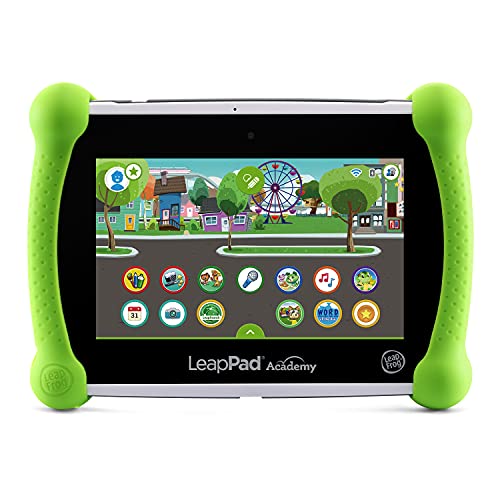
LeapFrog LeapPad Academy (Green)
- Best for: Preschool and early-elementary kids aged 3 to 8 whose parents want educator-approved apps already on the device.
- 7-inch shatter-safe screen, 1024 x 600 resolution
- 16 GB internal storage, microSD slot expandable up to 32 GB
- 20 educator-approved apps preloaded; Art Studio Ultra creativity tools
- LeapSearch kid-friendly web browser; LeapFrog App Center
Preschool and early-elementary kids aged 3 to 8 whose parents want educator-approved apps already on the device.
A 2019 device with only 16 GB storage and a 32 GB microSD cap; the LeapFrog Academy program is only a 3-month trial, then a paid plan; check live stock before buying, as this is the oldest listing in the roundup.
The LeapPad Academy is the only tablet here built from the ground up as a learning device rather than a general tablet with parental controls added on. It arrives with 20 educator-approved apps preloaded, covering reading, math, science, coding, spelling, puzzles and logic, plus Art Studio Ultra creativity tools and a stylus. The LeapSearch browser only opens kid-friendly sites, and parents set time limits and approve websites from the parent controls. It is a 2019 device with a 7-inch 1024 x 600 screen and only 16 GB of storage, so it is the least powerful tablet here, but it is also the most focused on learning out of the box.
Watch out for: A 2019 device with only 16 GB storage and a 32 GB microSD cap; the LeapFrog Academy program is only a 3-month trial, then a paid plan; check live stock before buying, as this is the oldest listing in the roundup.
Which One Fits Your Situation
A first tablet for a 3-to-5-year-old
Choose the Fire HD 8 Kids or the LeapPad Academy. The Fire HD 8 Kids gives young children the thickest case, the simplest age filters and a year of Kids+, with 1 TB of microSD room. The LeapPad Academy suits parents who want educator-approved apps preloaded and a closed browser. Pick the Fire for a bigger library ahead, and the LeapPad for a device that is a learning tool from the first minute.
An older child starting schoolwork
Choose the Fire HD 10 Kids Pro. Its 10.1-inch 1080p screen keeps textbooks and reading apps legible, and its 3 GB of RAM handles switching between apps better than either 8-inch model. The approval system, where kids request apps and parents approve downloads, fits a child who is ready for more independence but still needs limits. The slim case is easier to carry to school than the thick Kid-Proof Case on the younger models.
A tablet that travels to school and on trips
Choose the Fire HD 8 Kids Pro. It is the lightest Pro model, with the same Kids+ library as the 10-inch tablets in a body that fits a school bag. The 8-inch screen is small enough to hold one-handed on a bus, and the slim case with its stand works on a tray table. Accept the trade-off: 2 GB of RAM and 2 MP cameras are weaker than the 10-inch Pro, so heavy multitasking and video calls will feel slower.
A family that reads together on the biggest screen
Choose the Fire HD 10 Kids. Its 10.1-inch 1080p display is the largest here, and the Kid-Proof Case with its built-in stand props the tablet up for shared reading on the sofa. The age filters for 3 to 7 year olds keep the content appropriate for younger siblings too, and the two-year worry-free guarantee covers the drops that happen when a tablet is passed around. It is the best shared family tablet in this roundup.
Common Mistakes
- Buying a Pro model expecting faster hardware: the Pro tablets have identical hardware to their non-Pro twins, differing only in case and age filters.
- Assuming Google Play works on a Fire Kids tablet: no Fire Kids tablet has Google Play, so Google Classroom and Play Store apps need workarounds.
- Forgetting that Amazon Kids+ auto-renews after the included year, turning a free first year into a monthly plan.
- Picking by the age label alone at ages 6 to 7, when both the Kids and Kids Pro ranges apply; steer by reading level and independence instead.
- Ignoring storage limits on the LeapPad Academy: 16 GB internal storage with a 32 GB microSD cap fills up far faster than the 1 TB expansion on every Fire tablet.
Frequently Asked Questions
Do Fire Kids tablets have Google Play?
No. No Fire Kids tablet ships with Google Play, so Google Classroom and other Play Store learning apps do not work out of the box. Parents who need Google apps should buy a full Android tablet instead, or use the Fire tablet’s browser and Amazon Appstore alternatives. The LeapPad Academy runs Android and can download popular Android apps, which is one reason some families choose it despite older hardware.
What happens when the free Amazon Kids+ year ends?
Amazon Kids+ auto-renews as a paid monthly plan after the included year on all four Fire tablets, unless a parent cancels it first. The renewal keeps the same age-filtered books, games, apps and videos, so nothing disappears on day one, but the cost continues month after month. Set a reminder before the first year ends and decide then whether the library is worth the monthly charge.
Is the Kids Pro faster than the regular Kids tablet?
No. The Fire HD 10 Kids Pro has identical hardware to the Fire HD 10 Kids: the same screen, processor, RAM and storage. The same is true of the 8-inch pair. The Pro models cost more for a slimmer case, age filters for 6 to 12 year olds and an interface that lets kids request apps, not for speed. Buy the Pro for the older-kid experience, not for speed.
Can a 6-year-old use a Kids Pro tablet?
Yes. Kids covers ages 3 to 7 and Pro covers ages 6 to 12, so ages 6 and 7 sit in both. A 6-year-old who reads alone and asks a parent to approve downloads fits a Pro model. A 6-year-old who still needs large text, a thick case and a locked-down screen is better on a Kids model. Let reading level and independence decide, not the age label alone.