Our Short List of 3
All 3 Picks at a Glance
| Product | Specs | Action |
|---|---|---|
 2. Energizer MAX D, 8 Pack | Check price on Amazon | |
 3. Amazon Basics D Cell Alkaline, 12 Pack | Check price on Amazon | |
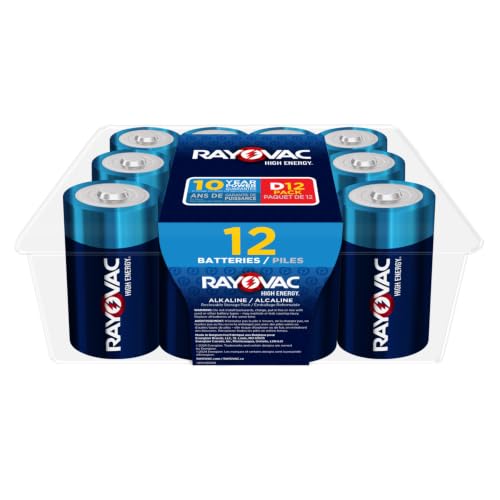 4. Rayovac D Alkaline, 12 Pack | Check price on Amazon |
Key takeaways
- The Concept2 PM5, PM4 and PM3 use two 1.5V D-cell alkaline LR20 batteries. Compare Duracell, Energizer, Amazon Basics and Rayovac D cells for your rower monitor.
As an Amazon Associate we earn from qualifying purchases.
Affiliate Disclosure: This article contains affiliate links. If you buy through a link on this page, we may earn a commission at no extra cost to you. We only list batteries that match the type Concept2 specifies for its Performance Monitors, and specifications below are taken from manufacturer and product listing information, not from detailed research by us.
If the monitor on your Concept2 rower has gone blank, is showing a low-battery warning, or keeps losing the date and time between sessions, the fix is simpler than most people expect. There is no special Concept2-branded battery, no rechargeable pack you have to order from the factory for the current monitors, and no obscure cell size hidden inside the housing. Concept2 Performance Monitors run on ordinary D-cell alkaline batteries — the same large cylindrical cells used in big flashlights and radios. That makes choosing the best battery for a Concept rower mostly a question of buying the correct type, in a fresh pack, from a brand whose cells you trust not to leak inside an expensive monitor.
This guide states the exact specification first, then compares four widely available D-cell alkaline options that meet it. It also covers what not to buy, because Concept2 is unusually explicit about one warning: do not use lithium or high-voltage cells in the PM5. It explains how the rower itself helps power the monitor while you row, why batteries still matter when the flywheel can generate power, how to change the cells without losing your settings, and how to tell a genuine battery problem apart from a loose battery door, corroded contacts, or a monitor fault.
The short answer: what battery a Concept2 monitor actually uses
According to Concept2’s own PM5 product manual and quick start guide, the PM5 is powered by two replaceable D-cell alkaline batteries. The guide states the requirement plainly: use 1.5 volt alkaline D Cell (LR20) batteries. LR20 is the IEC designation for a standard alkaline D cell, and MN1300 is the equivalent ANSI designation you will also see printed on packs. The same basic specification applies to the earlier monitors most used rowers still carry. Concept2 documentation for the PM3 states that it uses two alkaline D-Cell (LR20) batteries, and PM4 documentation refers to the same D-cell arrangement, with some PM4 units also able to use a rechargeable pack that Concept2 supplied for racing setups.
So the complete shopping rule fits in one sentence: buy two fresh 1.5 volt alkaline D cells, marked LR20 or MN1300, install them as a matched pair, and repeat with another matched pair when the monitor eventually reports low power. Everything else in this article — brand, pack size, shelf life, storage — is secondary to getting that type right.
Concept2 also gives two safety and care instructions that belong in any buying guide. First, do not use lithium or 3.6 volt batteries in the PM5, because the manual warns of a risk of fire or explosion with those chemistries. Second, remove the batteries if the monitor will not be used for a period of four months or more, which reduces the chance of a forgotten cell leaking during long storage. The manual also says not to mix different types of batteries, or a mixture of new and used batteries, and that new cells must be installed with the correct polarity.
Our picks at a glance
All four picks below are the same core product type — 1.5 volt D-cell alkaline batteries — because that is what the monitor requires. They differ in brand, pack size, and stated storage life, which is where a sensible choice can actually be made.
- Duracell Coppertop D, 4 Count — Best all-round pick for a single rower
ASIN: B00000JHQE - Energizer MAX D, 8 Pack — Best for a home gym with other D-cell devices
ASIN: B000F64P4G - Amazon Basics D Cell Alkaline, 12 Pack — Best bulk pack for clubs and shared machines
ASIN: B00MH4QKP6 - Rayovac D Alkaline, 12 Pack — Budget-oriented bulk alternative
ASIN: B00008MOQ7
Evidence note: Amazon blocked live product-page reads for most of these listings during our check, so these ASINs are recorded as candidates based on indexed Amazon US listings rather than as live-verified in-stock reads. Check the listing for current availability before ordering, and confirm the pack in your cart is the D size, not C or AA, before you check out.
1. Duracell Coppertop D, 4 Count
For a single rower at home, a four-count pack of Duracell Coppertop D cells is the most straightforward recommendation in this roundup. One pack gives you one full change for the monitor — two cells installed — plus a matched spare pair from the same pack and production batch, which matters because Concept2 advises against mixing new and used cells or different types. Installing two cells bought together, stored together, and used together is the cleanest way to follow that guidance.
Coppertop is Duracell’s long-running alkaline line, and the D cell in this range is a 1.5 volt alkaline LR20 cell, which is exactly the specification in the Concept2 manual. Duracell markets the Coppertop range with a long storage guarantee, stating that the cells are guaranteed for ten years in storage. For a rower monitor, storage life is not a trivial detail. A PM5 sips power, especially on newer rowers where the flywheel contributes power while you row, so a pair of D cells can stay in service for a long stretch. The spare pair may sit in a drawer for a year or more before it is needed, and a cell that holds its charge in storage is precisely what you want from that spare pair.
This pick suits the typical RowErg, Model D, or Model E owner who wants the battery question settled with a recognised brand and no surplus. If your household has no other D-cell devices, a large bulk pack is more likely to age in a cupboard than to save you effort, and a four-count pack keeps the stock rotating. As with any alkaline cell, inspect the cells before installation: reject any cell with swelling, corrosion, or damage to the wrapper, and never install a cell that has leaked.
2. Energizer MAX D, 8 Pack
The Energizer MAX D eight-pack is the pick for households where the rower monitor is not the only D-cell load. The listing information for this product identifies it as an eight-pack of D alkaline batteries from Energizer’s MAX line, with the manufacturer listed as Eveready Battery Co. and part number E95BP-8H. E95 is Energizer’s designation for the D size, and the MAX line is its mainstream long-life alkaline range.
Energizer describes MAX D cells as holding power for up to ten years in storage, using its PowerSeal technology, which the brand presents as its approach to keeping energy available and helping protect against leakage in stored devices. Again, that storage behaviour maps well onto monitor use. An eight-pack covers four complete monitor changes if it is used only for the rower, which is more than most home rowers will get through quickly, so in practice this pack makes most sense when the extra cells also serve flashlights, a portable radio, or other gym and household equipment.
Choose this option if you prefer the Energizer brand, already standardise on MAX cells elsewhere in the house, or want a mid-sized pack that balances spare capacity against stock sitting idle. The same installation rules apply: fit two cells from the same pack at the same time, match polarity to the diagram in the battery compartment, and keep the remaining cells in their packaging, in a cool dry place, away from loose metal objects that could short the terminals.
3. Amazon Basics D Cell Alkaline, 12 Pack
For a rowing club, a school gym, a CrossFit box with a fleet of ergs, or a shared facility that maintains several Concept2 machines, pack size becomes the deciding factor, and the Amazon Basics twelve-pack is the practical bulk choice here. The product is listed as a twelve-pack of D cell all-purpose alkaline batteries at 1.5 volts, with a stated five-year shelf life. Twelve cells equal six complete monitor changes, so one pack can service six monitors once, or one monitor through several years of changes with spares left over.
The shorter stated shelf life compared with the two big-brand picks above is the honest trade-off to note. For a fleet, that trade-off rarely bites, because the cells are used in rotation rather than stored for many years. For a single home rower, it is a reason to prefer a smaller pack: there is little benefit in holding twelve cells if the last pair will be installed long after the stated shelf life has passed. Buy the pack size that matches your rate of use, not the largest pack on the page.
Amazon Basics cells are marked with the D, LR20, AM1 and MN1300 designations, which are the size and standard codes you want to see for this application. They are non-rechargeable alkaline cells, which is correct for the PM5 guidance, and they should be recycled through a local battery recycling route at end of life rather than placed in household waste where local rules prohibit it. Facilities maintaining multiple monitors should label each monitor with the date its batteries were fitted; with several identical machines in a row, a simple date label prevents both premature changes and neglected ones.
4. Rayovac D Alkaline, 12 Pack
Rayovac is the value-oriented name in this group, and its D alkaline twelve-pack is included as a bulk alternative for buyers who maintain several monitors and prioritise pack economy over brand preference. The cells are standard 1.5 volt alkaline D cells, which is the requirement that matters for Concept2 compatibility, and a twelve-pack provides the same six-change coverage as the other bulk option above.
We are transparent about the evidence for this pick: the ASIN was identified from indexed listing data rather than from a live read of the Amazon US product page, which we could not complete during this check. Treat it as a candidate listing, verify on the product page that the item in your cart is the D-cell alkaline twelve-pack and not a different size or count, and check the stated storage guarantee on the current packaging, because Rayovac has used different guarantee periods across its High Energy and Ultra Pro lines over the years.
Why the monitor still needs batteries when the flywheel generates power
Newer Concept2 rowers feed power to the monitor from the flywheel while you row, and Concept2 documentation notes that this extends battery life. That leads some owners to ask why batteries are needed at all, and a few discover the answer the awkward way: the monitor can light up during a row with weak or even missing cells on some setups, but it cannot reliably keep its clock, language, custom lists and memory, wake instantly at the first pull, or hold a session together at rest without battery power behind it.
Think of the batteries as the monitor’s baseline power and memory keep-alive, and the flywheel contribution as a top-up that stretches the interval between changes. That is also why symptoms of dying cells often appear first between sessions rather than during one: the date has reset, the monitor is slow to wake, the display fades when you stop rowing, or the low-battery warning appears even though the screen looked fine mid-workout. When those signs appear, fit a fresh matched pair rather than swapping in one new cell alongside an old one.
What not to buy for a Concept2 monitor
The exclusions matter as much as the picks. Do not buy lithium D cells for a PM5, and do not buy 3.6 volt cells of any branding; Concept2’s manual explicitly warns against them. Do not buy rechargeable packs or loose rechargeable D cells on the assumption that rechargeable is automatically better here. The Concept2 forum and manuals show owners have experimented with nickel-metal hydride rechargeables, and rechargeable cells deliver a lower nominal voltage than alkaline, which can trigger early low-battery warnings and inconsistent behaviour; the manufacturer’s specified type is alkaline, and this guide follows the manufacturer. Do not buy C, AA or AAA cells hoping adapters will be a clever workaround for a primary training tool; the compartment is made for D cells, and a monitor that resets mid-test is a false economy. Finally, do not buy a single loose cell to top up one weak side. Replace the pair together.
How to change the batteries on a PM5, PM4 or PM3
Changing the cells takes a few minutes and needs no tools beyond what the monitor housing itself provides. Turn the monitor over or swing it on its arm so you can reach the back. Open the battery compartment on the rear of the monitor — on the PM5 the cover is released by turning the small knob on the back — and note the polarity diagram moulded in the compartment before you remove anything. Take out both old cells. If there is any white or green residue on the contacts, stop and clean the compartment carefully with a dry cloth, and do not install fresh cells against heavy corrosion without addressing it, because corroded contacts are a common cause of a monitor that still misbehaves with new batteries.
Fit the two new cells with polarity matching the diagram, close the cover firmly, and turn the monitor on. Concept2’s PM3 documentation notes that to avoid losing date, time, language, custom list and memory during a change, the monitor should be off and the swap completed within a few minutes; the same quick, prepared swap is good practice on any model, so have the new pack open before you remove the old cells. Check the battery status through the monitor’s utilities or information menu after fitting, and confirm the date and time are correct before your next logged session, so your logbook entries stay in order.
If a monitor will not wake after a change, reseat the batteries, try another fresh pair, use the reset point on the back, and check the monitor cable is plugged in and undamaged.
Buying advice: brand, pack size and storage
Because every legitimate option is the same cell type, the buying decision reduces to three practical questions. First, how many monitors are you maintaining? One rower needs a four-pack; a fleet justifies twelve. Second, how long will spares sit before use? Long storage favours the brands stating a ten-year storage guarantee; fast fleet rotation makes a five-year stated shelf life perfectly serviceable. Third, what is your tolerance for leakage risk in a monitor that costs far more than the cells inside it? No alkaline cell from any brand can promise it will never leak, which is why the four-month removal rule for unused monitors, sensible storage, and inspection at every change are worth following regardless of brand.
Frequently asked questions
What batteries does a Concept2 PM5 take? Two 1.5 volt alkaline D-cell batteries, standard code LR20. That is stated in Concept2’s PM5 manual and quick start guide.
Do the PM3 and PM4 use the same batteries? Yes, for the standard battery arrangement. Concept2 documentation for the PM3 specifies two alkaline D-Cell LR20 batteries, and the PM4 uses the same D-cell basis, with a rechargeable pack existing for some PM4 racing configurations.
Can I use rechargeable D batteries in my rower monitor? Concept2 specifies alkaline cells, and this guide recommends following that specification. Rechargeable nickel-metal hydride cells run at a lower nominal voltage, which can cause early low-battery indications, and lithium or 3.6 volt cells are explicitly warned against in the PM5 manual.
How long should a set of batteries last? It depends on monitor generation and wireless use. Expect months of typical home use rather than weeks; a set that dies in weeks signals a door, contact or monitor problem.
My monitor works while I row but is blank at rest. Is that the batteries? Very often, yes. The flywheel can contribute power during rowing on newer models, masking weak cells until you stop. Fit a fresh matched pair and re-check before pursuing repairs.
Should I remove the batteries when storing the rower? If the monitor will not be used for four months or more, yes. Concept2 advises removing them for storage periods of that length, which also protects the compartment from leakage damage.
Verdict
The best battery for a Concept rower is not exotic: it is a fresh, matched pair of 1.5 volt alkaline D cells, code LR20, from a brand and pack size matched to how many monitors you run. Choose the Duracell Coppertop four-count for a single home rower, the Energizer MAX eight-pack if D cells serve other devices in your home too, and either twelve-pack — Amazon Basics for straightforward fleet supply, Rayovac as the value alternative — when you maintain several machines. Fit the pair together, note the date, remove the cells before long storage, and never substitute lithium or high-voltage cells. Do those few things and the monitor will simply be there, accurate and ready, every time you sit down to row.