Key takeaways
- Compare the best memory for smartphones: four microSD cards with A2 app speed, V30 video ratings and capacities from 64GB to 512GB for Android phones.
A phone that runs out of storage stops being fun very quickly. Photos refuse to save, app updates stall, and the camera warns you at exactly the moment you wanted to record something. For Android phones with a microSD slot, a memory card is still the simplest way to add room: you slide it into the tray, point your camera and downloads at it, and the internal storage pressure eases. The trade-off is that cards are not all equal. A slow card can make apps feel sluggish and can drop frames in high-resolution video, while a card with the right speed classes quietly does its job for years.

This guide is for smartphone owners whose phones accept microSD cards and who want more space for photos, video, music, and apps without replacing the handset. The four cards below were chosen from their Amazon listing names and specifications only: capacity, read speed, the UHS-I interface, the C10, U3, and V30 speed classes, and the A2 app performance rating that matters most when a card holds apps and frequently accessed files. Three come from one Samsung family at different capacities, and the fourth is a smaller, faster-writing SanDisk card, so the real decision here is mostly about how much space you need and how much write speed matters to you.
Quick Picks
Our Short List of 3
- Best for: Most smartphone owners who want one card that handles photos, video, and apps without a second thought.
- Brand: Samsung
- Model Number: MB-ME256SA/AM
- Capacity: 256GB
- Format: microSDXC, UHS-I
- Best for: Heavy shooters, frequent travelers, and anyone who wants to install a card once and forget about storage limits.
- Brand: Samsung
- Model Number: MB-ME512SA/AM
- Capacity: 512GB
- Format: microSDXC, UHS-I

- Best for: Owners of nearly full phones who want a meaningful storage boost for photos, music, and everyday apps.
- Brand: Samsung
- Model Number: MB-ME128SA/AM
- Capacity: 128GB
- Format: microSDXC, UHS-I
All 3 Picks at a Glance
| Product | Specs | Action |
|---|---|---|
| Samsung EVO Select microSDXC Card + Adapter, 256GB (MB-ME256SA/AM) |
| Check price on Amazon |
| Samsung EVO Select microSDXC Card + Adapter, 512GB (MB-ME512SA/AM) |
| Check price on Amazon |
| Samsung EVO Select microSDXC Card + Adapter, 128GB (MB-ME128SA/AM) |
| Check price on Amazon |
How to Choose
Capacity: buy for the library you are building
Capacity is the headline number, and it should match how you actually use your phone. A 64GB card suits a light user who mainly wants room for music, documents, and a modest photo collection. Step up to 128GB or 256GB if you shoot photos daily, keep offline video, or store large games, because modern phone cameras fill space far faster than most people expect. The 512GB option is for people who record a lot of video, travel without a laptop to offload files, or simply never want to think about storage again. Remember that a card only helps if your phone has a microSD slot, so confirm that before choosing a size.
Speed classes: what C10, U3, and V30 actually tell you
The letters printed on a card are minimum sustained performance guarantees. Class 10 (C10) is the baseline for full HD recording. The U3 mark raises the minimum sustained write speed, which matters for burst photography and high-bitrate video. V30, the video speed class found on all four cards here, certifies the card for demanding video capture, including 4K recording on phones that support it. These classes describe floors, not peaks: a card can transfer faster than its class minimum in short bursts, but the class rating is what you can rely on during a long recording.
A2 app performance: the rating that matters for apps
If you plan to store apps or app data on the card, look for the A2 rating. App performance class measures how quickly a card handles many small random reads and writes, which is exactly what apps do when they launch and load data. All four cards in this guide carry an A2 rating, so any of them is a reasonable home for apps on phones that allow apps to move to external storage. Without an A rating, a card can still hold photos and video perfectly well, but apps stored on it may open slowly and feel unresponsive.
Read and write speeds: know which direction you care about
Read speed governs how fast files come off the card: opening photos, loading media into an editor, or copying a folder to a computer with the included SD adapter. Write speed governs how fast the phone can save new data, which affects burst photos and long video clips. The Samsung cards here list read speeds of up to 160MB/s, while the SanDisk card lists up to 200MB/s read and up to 140MB/s write, the only stated write figure in this group. If you mostly archive and view media, read speed dominates your experience. If you shoot constantly, write speed deserves more weight.
The 4 Best Options
Samsung EVO Select microSDXC Card + Adapter, 256GB (MB-ME256SA/AM)
- Best for: Most smartphone owners who want one card that handles photos, video, and apps without a second thought.
- Brand: Samsung
- Model Number: MB-ME256SA/AM
- Capacity: 256GB
- Format: microSDXC, UHS-I
Most smartphone owners who want one card that handles photos, video, and apps without a second thought.
There is no stated write speed in the listing, so if sustained write performance is your top priority, compare it carefully with the SanDisk below.
The Samsung EVO Select 256GB sits in the middle of the EVO Select range and is the easiest recommendation for most people. Its 256GB capacity doubles or quadruples the storage of many phones, which is enough headroom for years of photos, a large offline music library, and a healthy set of apps. The card carries the full set of markings a smartphone card should have: UHS-I interface, C10, U3, and V30 speed classes, and the A2 app performance rating for phones that run apps from external storage.
Samsung also leans on durability with this family. The listing describes 6-proof protection covering water, temperature, X-ray, magnet, drop, and wearout resistance, which suits a card that will live inside a phone carried everywhere. A 10-year limited warranty backs it, and the included SD adapter makes it simple to move files to a laptop or to reuse the card in a camera later.
Watch out for: There is no stated write speed in the listing, so if sustained write performance is your top priority, compare it carefully with the SanDisk below.
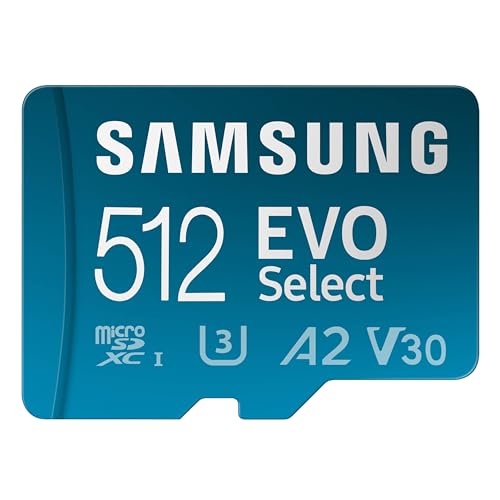
Samsung EVO Select microSDXC Card + Adapter, 512GB (MB-ME512SA/AM)
- Best for: Heavy shooters, frequent travelers, and anyone who wants to install a card once and forget about storage limits.
- Brand: Samsung
- Model Number: MB-ME512SA/AM
- Capacity: 512GB
- Format: microSDXC, UHS-I
Heavy shooters, frequent travelers, and anyone who wants to install a card once and forget about storage limits.
The extra capacity only pays off if you actually fill it; light users pay for space they never touch, and the card still depends on your phone having a microSD slot.
The Samsung EVO Select 512GB is the same card family at double the capacity, aimed at people whose phones double as their main camera and media archive. Half a terabyte of removable storage changes how you use a phone: you can keep entire trips of photos and video on the device, download seasons of shows for flights, and stop deleting things just to make room for the next app update.
Everything else matches its smaller siblings. It is a UHS-I microSDXC card with C10, U3, and V30 classes, an A2 app performance rating, and read speeds of up to 160MB/s. The listing markets it for mobile phones, smartphones, and tablets, and it carries the same 6-proof protection, 10-year limited warranty, and included SD adapter as the rest of the EVO Select line. For a phone you plan to keep for several years, this is the capacity that ages the most gracefully.
Watch out for: The extra capacity only pays off if you actually fill it; light users pay for space they never touch, and the card still depends on your phone having a microSD slot.
Samsung EVO Select microSDXC Card + Adapter, 128GB (MB-ME128SA/AM)
- Best for: Owners of nearly full phones who want a meaningful storage boost for photos, music, and everyday apps.
- Brand: Samsung
- Model Number: MB-ME128SA/AM
- Capacity: 128GB
- Format: microSDXC, UHS-I
Owners of nearly full phones who want a meaningful storage boost for photos, music, and everyday apps.
If you record video often, 128GB fills faster than expected; frequent shooters should look at the 256GB or 512GB versions instead.
The Samsung EVO Select 128GB is the straightforward upgrade for a phone that is nearly full but does not need a huge archive. For many owners, 128GB of added space is the difference between constant storage warnings and a phone that just works: room for a few years of photos, offline maps and music, and the apps that would not fit before.
Because it belongs to the same EVO Select family, you give up nothing in ratings by choosing the smaller card. It offers read speeds of up to 160MB/s, the C10, U3, and V30 speed classes, and A2 app performance for smartphones and tablets. The 6-proof protection, 10-year limited warranty, and bundled SD adapter are all present as well. It is the sensible pick when your internal storage is the bottleneck but your media library is modest.
Watch out for: If you record video often, 128GB fills faster than expected; frequent shooters should look at the 256GB or 512GB versions instead.
SanDisk 64GB Extreme PRO microSDXC Card + SD Adapter (SDSQXCU-064G-GN6MA)
The SanDisk 64GB Extreme PRO takes the opposite approach from the big Samsung cards: modest capacity, maximum speed. Its listing states read speeds of up to 200MB/s and write speeds of up to 140MB/s, the fastest figures in this guide and the only explicit write speed given. That makes it interesting for phones used for rapid burst photography or frequent high-bitrate recording, where how fast the card absorbs data matters more than how much it holds.
The card carries the UHS-I interface with C10, U3, and V30 classes plus the A2 app performance rating for smartphones, and the listing also names action cameras and drones as suitable hosts, which hints at its performance focus. SanDisk includes its RescuePRO Deluxe software, a recovery tool for accidentally deleted files, along with the SD adapter. The compromise is obvious: at 64GB, this is a working card you offload regularly, not a long-term archive.
Specs
- Brand: SanDisk
- Model Number: SDSQXCU-064G-GN6MA
- Capacity: 64GB
- Format: microSDXC, UHS-I
- Read speed: up to 200MB/s
- Write speed: up to 140MB/s
- Speed classes: C10, U3, V30
- App performance: A2
- Software: RescuePRO Deluxe included
- Included: SD adapter
Best for: Speed-first users who shoot bursts or video constantly and offload files often, and who value the included recovery software.
Watch out for: 64GB is small by current standards and fills quickly with video; if you rarely transfer files to a computer, a larger EVO Select card will serve you better.
Which One Fits Your Situation
Your phone is nearly full and you just need breathing room
Choose the Samsung EVO Select 128GB. It removes the storage warning problem for most people, keeps the same speed classes and A2 rating as its bigger siblings, and leaves internal storage free for the system and the apps that cannot move.
You shoot photos and video every day
Choose the Samsung EVO Select 256GB if your shooting is steady, or the 512GB if you record long videos, travel for weeks at a time, or keep everything on the phone. Both give you V30-rated recording headroom and enough capacity that deleting old clips stops being a weekly chore.
You care about write speed more than capacity
Choose the SanDisk 64GB Extreme PRO. It is the only card here with a stated write speed, up to 140MB/s, and its up to 200MB/s read speed also speeds up transfers when you slot the adapter into a computer. Just plan to offload it regularly.
You are setting up a phone for years of use
Choose the Samsung EVO Select 512GB. The combination of the largest capacity here, A2 app performance, 6-proof protection, and a 10-year limited warranty makes it the install-and-forget option for a handset you intend to keep.
Common Mistakes
- Buying a card before checking that your phone actually has a microSD slot, since many recent flagships have removed expandable storage entirely.
- Choosing capacity by habit instead of by your library, then discovering that video alone fills a small card within a few months.
- Ignoring the A2 rating when you plan to store apps on the card, which can lead to slow app launches even on a card with fast headline read speeds.
- Assuming the biggest read number means the best recording card, when sustained write classes such as U3 and V30 are what long video clips depend on.
- Treating a memory card as your only copy of important photos, instead of backing files up to a computer or cloud storage as well.
Frequently Asked Questions
Will any of these cards work in my phone?
They work in phones with a microSD slot that supports microSDXC cards. All four are UHS-I microSDXC cards, which is the format most Android phones with expandable storage accept. Check your phone’s specifications for a microSD slot and its maximum supported card size before ordering, because phones without a slot cannot use any card.
What does the A2 rating mean for everyday use?
A2 is an app performance class that reflects how quickly a card handles the small, random reads and writes apps constantly perform. On a phone that lets you move apps to the card, an A2 card helps those apps launch and load data more smoothly. For pure photo and video storage, A2 matters less, but it does no harm to have it.
Can these cards record 4K video from a phone?
All four cards carry U3 and V30 ratings, which certify minimum sustained write speeds intended for demanding video, including 4K capture on devices that support it. Whether your phone records 4K to the card also depends on the phone’s own camera settings, since some phones restrict their highest video modes to internal storage.
Is it better to buy one large card or a smaller, faster one?
It depends on your habit. If you rarely connect your phone to a computer, a large card such as the 512GB EVO Select keeps everything in one place. If you offload files often and shoot in bursts, the smaller SanDisk Extreme PRO trades capacity for the fastest stated read and write speeds here. Most people in between land on the 256GB card.
Related guides
- Best SSDs for Time Machine
- Best SD Cards for Drone Photos
- Best Internal Hard Drives for Gaming
As an Amazon Associate, we earn from qualifying purchases.