Our Short List of 3
All 5 Picks at a Glance
| Product | Specs | Action |
|---|---|---|
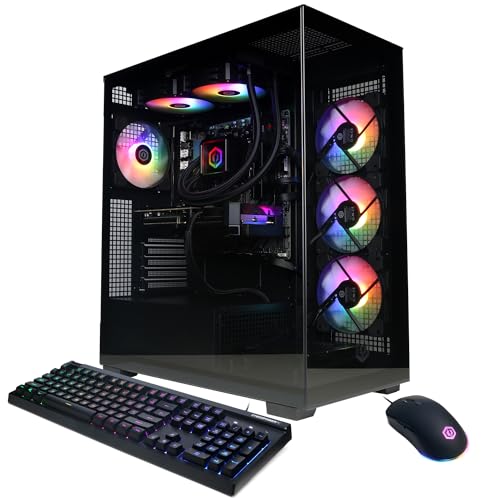 1. CyberPowerPC Gamer Xtreme GXiVR8080A41 | Check price on Amazon | |
 2. iBUYPOWER Element EWA9N5702 | Check price on Amazon | |
 3. CyberPowerPC Gamer Master GMA2900A2 | Check price on Amazon | |
 4. Skytech Azure 3 ST-AZURE3-1850-B-AM | Check price on Amazon | |
 5. Skytech Azure 3 ST-AZURE3-1564-W-AM | Check price on Amazon |
Key takeaways
- Best custom PCs: prebuilt CyberPowerPC, iBUYPOWER and Skytech desktops with RTX graphics, Ryzen chips, DDR5 memory and fast NVMe storage compared side by side.
Disclosure: As an Amazon Associate, this site may earn from qualifying purchases made through links on this page.
Intro
“Custom PC” can mean two things: a machine you build from parts, or a machine a builder assembles from parts you choose. This guide covers the second kind — complete desktops from custom-PC builders, sold as finished systems on Amazon US. You plug one in, and it runs. No assembly, no part matching, one builder to call if something goes wrong.
The five systems below come from three builders — CyberPowerPC, iBUYPOWER and Skytech — and all five run Windows 11 Home with DDR5 memory and NVMe storage. The differences sit where they matter: the graphics card, the processor, and the memory size. Three of the five carry the RTX 5070 with 12GB of graphics memory. The other two carry the RTX 5060 Ti with 8GB and the RTX 4060 with 8GB. Two carry 12-core Ryzen 9 chips; three carry 8-core Ryzen 7 chips.
That spread is the point of the guide. A custom PC is not one machine at one level. It is a range of machines built around the same idea — chosen parts, assembled and covered by one builder — and the right one depends on what you play, what else you run, and how much room you want to grow into.
At a Glance
- CyberPowerPC Gamer Xtreme GXiVR8080A41 — Ryzen 9 9900X, RTX 5070 12GB, 32GB DDR5, 1TB SSD. The flagship of the group.
- iBUYPOWER Element EWA9N5702 — Ryzen 9 7900X, RTX 5070 12GB, 32GB DDR5, 1TB SSD. The same graphics tier, sold and shipped by Amazon.
- CyberPowerPC Gamer Master GMA2900A2 — Ryzen 7 8700F, RTX 5060 Ti 8GB, 16GB DDR5, 1TB SSD. The step-down in graphics and memory.
- Skytech Azure 3 ST-AZURE3-1850-B-AM — Ryzen 7 7700X, RTX 5070 12GB, 32GB DDR5, 1TB SSD. The same graphics tier with an 8-core chip.
- Skytech Azure 3 ST-AZURE3-1564-W-AM — Ryzen 7 9700X, RTX 4060 8GB, 16GB DDR5, 1TB SSD. The entry point of the group.
How to Choose
Start with the graphics card, because it sets what the machine can do in games. The RTX 5070 suits high-refresh 1440p play. The RTX 5060 Ti suits 1080p and 1440p at more modest settings. The RTX 4060 is the 1080p pick. All three are current-generation cards with hardware support for ray tracing and upscaling, so the choice is about the tier, not about whether the card can run a modern game.
Next, the processor. The two 12-core Ryzen 9 chips — the 9900X and the 7900X — suit gaming plus streaming, editing, or heavy multitasking, where extra cores keep the machine smooth while a game runs alongside other work. The three 8-core Ryzen 7 chips — the 9700X, the 8700F and the 7700X — suit gaming alone and lighter workloads. An 8-core chip is not a weak chip. It is the right chip when gaming is the main job and little else runs at the same time.
Memory is the third fork. Thirty-two gigabytes suits streaming, editing, or many apps open at once. Sixteen gigabytes is enough for gaming alone. Memory is also the easiest part to add later in a standard desktop, so a 16GB machine is not a dead end — it is a machine you can grow.
Storage is the same across all five systems: a 1TB NVMe SSD. That holds Windows and a solid game library. If you keep a large library, check the listing for a spare slot before you buy, because adding a second drive is far simpler than shuffling games on and off one drive.
Cooling and noise deserve a look too. Builders size the cooler to the chip, and a liquid cooler runs quieter under load while an air tower is simpler to live with. Either works when the builder sized it right. Check the listing for which cooler your system ships with, and make sure the case has room for the airflow the parts need.
Know what is in the box. A desktop ships as the tower alone unless the listing says otherwise. Monitor, keyboard and mouse are separate buys, and they are buys you should plan for, because a strong tower on a weak monitor wastes the graphics card.
Finally, the warranty. One builder, one support line, one machine covered end to end — that is the point of a prebuilt custom system. Read the listing for the warranty length and what it covers, and keep the builder’s support details with the machine.
The Picks
1. CyberPowerPC Gamer Xtreme GXiVR8080A41
CyberPowerPC Gamer Xtreme GXiVR8080A41
The Gamer Xtreme GXiVR8080A41 is the flagship of this group, and it holds that spot on parts alone. A Ryzen 9 9900X with 12 cores sits beside an RTX 5070 with 12GB of graphics memory, with 32GB of DDR5 memory and a 1TB PCIe Gen4 SSD behind them. WiFi is built in, and Windows 11 Home is installed. Nothing here is the minimum. Every part is the stronger option in its slot.
That combination suits the heaviest use in this guide: gaming at high-refresh 1440p while streaming, editing, or running other work at the same time. The 12-core chip keeps the machine smooth when a game shares the system with a stream or an edit, and the 32GB of memory leaves room for all of it. The 1TB Gen4 SSD keeps load times short and the system responsive.
Buy this system if you want the strongest all-round machine in the guide and you run more than games on it. It is the pick for gaming plus streaming, editing, or heavy multitasking, and the one to buy when you want the most room to grow into.
2. iBUYPOWER Element EWA9N5702
The iBUYPOWER Element EWA9N5702 matches the flagship on the parts that matter most. It carries the same RTX 5070 with 12GB of graphics memory, the same 32GB of DDR5 memory, and the same 1TB NVMe SSD. The chip is a Ryzen 9 7900X with 12 cores — a prior-generation flagship that still gives you twelve cores for gaming plus other work. Windows 11 Home is installed.
The difference from the flagship is the seller. A recent check found this system listed as new and in stock, sold and shipped by Amazon. For many buyers that matters as much as the parts: one seller, Amazon’s handling, and a straightforward path if anything goes wrong.
Buy this system if you want the same graphics tier and memory as the flagship with Amazon as the seller. It is the pick for a 12-core, 32GB machine at the RTX 5070 tier with the simplest buying path in the guide.
3. CyberPowerPC Gamer Master GMA2900A2
CyberPowerPC Gamer Master GMA2900A2
The Gamer Master GMA2900A2 is the step-down in this group, and it is a deliberate one. A Ryzen 7 8700F with 8 cores sits beside an RTX 5060 Ti with 8GB of graphics memory, with 16GB of DDR5 memory and a 1TB PCIe Gen4 SSD. WiFi is built in, and Windows 11 Home is installed. Every part is a tier below the flagship, and the machine is aimed squarely at gaming alone rather than gaming plus other work.
That aim suits a lot of buyers. The RTX 5060 Ti handles 1080p and 1440p play, the 8-core chip is plenty for a game running on its own, and 16GB of memory is enough for gaming alone. The 1TB Gen4 SSD is the same size and speed as the flagship’s, so load times do not suffer for the step down.
Buy this system if you play at 1080p or 1440p and want a current-generation machine without the flagship outlay. It is the pick for pure gaming at a lower tier, and the easiest way into a current-generation custom PC in this guide.
4. Skytech Azure 3 ST-AZURE3-1850-B-AM
Skytech Azure 3 ST-AZURE3-1850-B-AM
The Skytech Azure 3 ST-AZURE3-1850-B-AM pairs the flagship graphics card with a smaller chip. A Ryzen 7 7700X with 8 cores sits beside an RTX 5070 with 12GB of graphics memory, with 32GB of DDR5 memory running at 6000 and a 1TB Gen4 SSD. A 650W Gold power supply feeds the parts, WiFi is built in, and Windows 11 Home is installed.
That mix suits pure gaming better than any other system here. The RTX 5070 does the heavy lifting in games, the 32GB of memory leaves room for a stream or a browser full of tabs, and the 8-core chip is enough when gaming is the main job. You give up the 12-core chip of the two Ryzen 9 systems, and in return you keep the strongest graphics card and the full 32GB of memory.
Buy this system if gaming is the main job and you want the RTX 5070 tier without paying for a 12-core chip. It is the pick for pure gaming at the highest graphics tier in the guide.
5. Skytech Azure 3 ST-AZURE3-1564-W-AM
Skytech Azure 3 ST-AZURE3-1564-W-AM
The Skytech Azure 3 ST-AZURE3-1564-W-AM is the entry point of the group, and it pairs the newest chip here with the smallest graphics card. A Ryzen 7 9700X with 8 cores sits beside an RTX 4060 with 8GB of graphics memory, with 16GB of DDR5 memory running at 5200 and a 1TB NVMe SSD. A 650W Gold power supply feeds the parts, WiFi is built in, and Windows 11 Home is installed.
The 9700X is the newest processor in this guide, and it shows in the mix: a current chip, a solid 1TB drive, and a graphics card aimed at 1080p play. The RTX 4060 is the smallest card here, but it is still a current-generation card with hardware support for ray tracing and upscaling, and it handles 1080p play without strain.
Buy this system if you are buying a first gaming PC or you play at 1080p. It is the pick for the smallest outlay in the guide, with the newest chip and a clear path to add memory or a second drive later.
Comparison Table
| System | Processor | Graphics | Memory | Storage |
|---|---|---|---|---|
| CyberPowerPC Gamer Xtreme GXiVR8080A41 | Ryzen 9 9900X, 12 cores | RTX 5070 12GB | 32GB DDR5 | 1TB PCIe Gen4 SSD |
| iBUYPOWER Element EWA9N5702 | Ryzen 9 7900X, 12 cores | RTX 5070 12GB | 32GB DDR5 | 1TB NVMe SSD |
| CyberPowerPC Gamer Master GMA2900A2 | Ryzen 7 8700F, 8 cores | RTX 5060 Ti 8GB | 16GB DDR5 | 1TB PCIe Gen4 SSD |
| Skytech Azure 3 ST-AZURE3-1850-B-AM | Ryzen 7 7700X, 8 cores | RTX 5070 12GB | 32GB DDR5 | 1TB Gen4 SSD |
| Skytech Azure 3 ST-AZURE3-1564-W-AM | Ryzen 7 9700X, 8 cores | RTX 4060 8GB | 16GB DDR5 | 1TB NVMe SSD |
Which One Fits Your Situation
If you game and stream, edit, or run heavy work at the same time, take the Gamer Xtreme GXiVR8080A41 or the iBUYPOWER Element EWA9N5702. Twelve cores, the RTX 5070 and 32GB of memory handle a game plus other work without strain. Pick the Gamer Xtreme for the newest chip; pick the Element when you want Amazon as the seller.
If gaming is the main job and you want the strongest graphics card, take the Skytech Azure 3 ST-AZURE3-1850-B-AM. The RTX 5070 and 32GB of memory carry the load, and the 8-core chip is enough when little else runs at the same time.
If you play at 1080p or 1440p on a tighter budget, take the CyberPowerPC Gamer Master GMA2900A2. The RTX 5060 Ti and 16GB of memory cover gaming alone, and the 1TB Gen4 SSD keeps load times short.
If you are buying a first gaming PC, take the Skytech Azure 3 ST-AZURE3-1564-W-AM. The newest chip in the guide, a current-generation graphics card, and the smallest outlay make it the simplest way in, with room to add memory or a second drive later.
If you buy one system and want the strongest all-round machine, take the Gamer Xtreme GXiVR8080A41. It is the only system here with the newest 12-core chip, the strongest graphics card and 32GB of memory in one build.
FAQ
What does “custom PC” mean in this guide?
A complete desktop assembled by a custom-PC builder from chosen parts, sold as a finished system. Not a parts list, and not a laptop. You plug it in, and it runs.
Do these systems come with Windows installed?
Yes. All five ship with Windows 11 Home installed, so there is no OS to buy or install.
Can I add more storage or RAM later?
Yes. These are standard desktop builds with room for more. Check the listing for spare slots and spare drive bays before you buy, because the exact layout varies by case and board.
Do I need a monitor, keyboard and mouse?
Yes. The tower ships alone unless the listing says otherwise. Any monitor, keyboard and mouse will work. All five systems list WiFi, so a wired connection is optional, though a wired link still gives the steadiest connection for online play.
Is 16GB of memory enough for gaming?
Yes, for gaming alone. Step up to 32GB if you stream, edit, or keep many apps open at once. Memory is also the easiest part to add later, so a 16GB machine can grow with you.
What is the difference between the RTX 5070, the RTX 5060 Ti and the RTX 4060?
The 5070 sits a tier above the 5060 Ti, which sits a tier above the 4060. In practice, the 5070 suits high-refresh 1440p play, the 5060 Ti suits 1080p and 1440p, and the 4060 suits 1080p. All three are current-generation cards with hardware support for ray tracing and upscaling.
Final Take
Five systems, three builders, one idea: chosen parts, assembled and covered by one builder. The Gamer Xtreme GXiVR8080A41 is the strongest all-round machine, with the newest 12-core chip, the RTX 5070 and 32GB of memory. The iBUYPOWER Element EWA9N5702 matches it on graphics and memory with Amazon as the seller. The Skytech Azure 3 ST-AZURE3-1850-B-AM keeps the same graphics tier for pure gaming. The Gamer Master GMA2900A2 steps down a tier for 1080p and 1440p play. The Skytech Azure 3 ST-AZURE3-1564-W-AM is the entry point, with the newest chip and the smallest outlay.
If you buy one system, buy the Gamer Xtreme GXiVR8080A41. It is the only build here that pairs the newest 12-core chip with the strongest graphics card and 32GB of memory, and it leaves the most room to grow into. If Amazon as the seller matters more to you, buy the Element instead — same graphics tier, same memory, same idea. Whichever system you choose, plan for the monitor, keyboard and mouse, and check the listing once more before you buy so the machine that arrives is the machine you expect.